Payment card information for suppliers
Information for suppliers about what payment cards are, how to use them, and the rules around using them.
Payment cards are an easy way for our clients to pay for one-off costs, e.g. food. You need to be registered with us as a supplier before a client can use a payment card at your store.
Registered with us as a supplier
Clients must apply through us for a one-off cost. If it's approved, we'll load the money onto the card and allocate it to a supplier, e.g. The Warehouse, Tauranga.
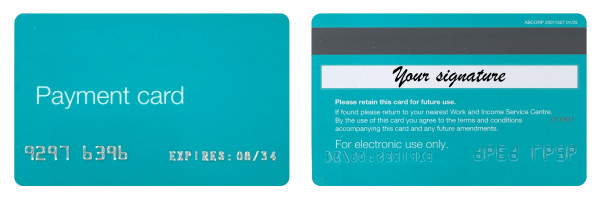
The card looks like a green EFTPOS card.
How payment cards work
The card works like an EFTPOS card.
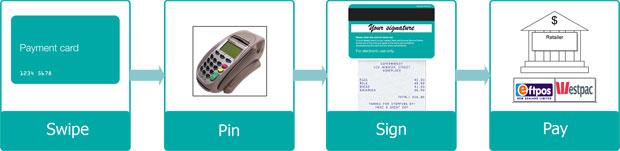
When the client comes to pay for their goods and services, follow these steps:
- Set the payment up as you usually would for an EFTPOS payment.
- The customer swipes the payment card through the EFTPOS machine and selects the 'CHQ' option.
- The customer enters their 4-digit payment card PIN. They must have set this online either in MyMSD or MyStudyLink.
- The EFTPOS terminal will ask you to 'accept with signature'. Ask the customer to sign their receipt, and check this matches their signature on the back of the card. If it matches, approve the transaction as normal. If the signatures do not match then decline the transaction on your till.
The money will stay on the card for 7 days from the day it was loaded - for glasses the money will be on the card for 28 days. After this, the payment expires and the money cannot be used.
Payment card rules
- Customers needs to apply for any help they need themselves or through their agent.
- Customers must pay using their own card, unless they are an agent. They must sign their receipt. If the signature does not match the one on their payment card, decline the transaction.
- Payment cards cannot be used to buy:
- alcohol
- cigarettes, tobacco or vaping products
- gift cards or vouchers (except for phone top-ups)
- lotto tickets
- non-essential appliances or electronics (such as an air fryer or gaming console).
- Payment cards cannot be used to withdraw cash.
- Customers cannot get change for any unused money on their card.
- Refunds on return of goods must be paid back to us, not the client.
If a payment card declines
Issues at the EFTPOS terminal
If your EFTPOS terminal says:
Refer to card issuer
Your EFTPOS terminal says 'Refer to card issuer' if the customer needs to set a PIN.
They can set their PIN quickly online or over the phone:
Incorrect PIN
Your EFTPOS terminal says 'Incorrect PIN' when the customer enters the wrong PIN.
The customer can try entering their PIN 5 times in total. After this the card will lock and they won't be able to use it.
PIN tries exceeded
Your EFTPOS terminal says 'PIN tries exceeded' when the customer has entered an incorrect PIN 5 times, and the card is now locked. They can unlock the card by resetting their PIN or try again the next day (the card will unlock at midnight).
Other reasons a payment card may decline
A payment card transaction might decline if:
- You're not a registered with us as a supplier. You can register with us to become a supplier, but this can take a few days.
- Your bank account number or EFTPOS terminal has changed. You’ll need to change your business details with us, but this can take a few days.
- The amount charged is more than the amount available on the payment card. The customer must reduce the amount being spent. They can also check the balance of the card in their MyMSD account.
- The payment has expired. Payments only remain on the card for 7 days (28 days for glasses), the customer will need to contact us.
- The payment card has been cancelled or expired. The customer will need to contact us.
Refunds
Refunds on return of goods must be paid back to us, not the customer. Find out more about refunds here:
If you need help
If you need help or have questions about being one of our suppliers, you can email us at cpu_suppliers@msd.govt.nz.