If you need more help with our Online Services, contact us.
Can't log in to Online Services
What to do if you have problems logging into MyMSD, apply online or apply for NZ Super.
Select the issue that applies to you below.
Can't log in with your username or password
If you enter the wrong username and password combination, an error message will display. Remember that your RealMe username and password are case-sensitive.
If you've forgotten your username or password, choose 'I forgot my username' or 'I forgot my password' and follow the steps.
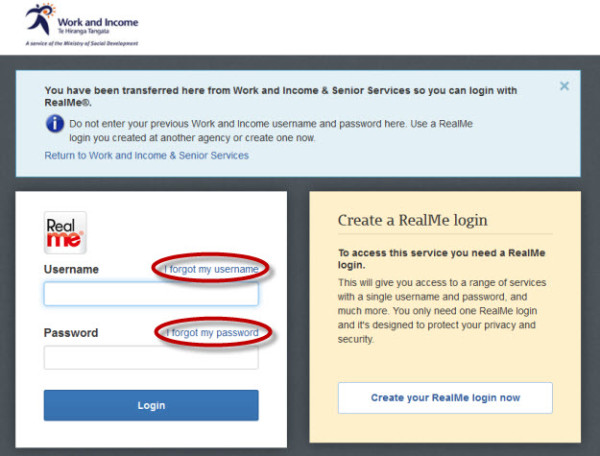
You'll need to enter the email address or mobile number you registered with RealMe.
If it's your password that you forgot, you'll also need to answer your security questions. The answers to your security questions are case-sensitive.
An email or text message will be sent to you with your username or a temporary password. When you log in with your temporary password, you'll be asked to change your password.
If you think someone knows your login details
Change your login details immediately.
For step by step screenshots on how to change your RealMe login information see:
You don't receive the RealMe text code
Your RealMe account should have your current mobile number as that's where it will send the six digit code for you to log in to Apply Online or My Account.
If you've changed your mobile number, make sure you update this information on your RealMe account by:
- log in to 'Manage your account' on the RealMe website
- select 'Change mobile'.
For step by step screenshots on how to change your RealMe login information see:
Change your username and password
If you haven't changed your mobile number and you don't receive the RealMe text codes, contact us.
We have suspended your access
If you get a message saying that we have suspended your access and we have not provided you with a new one-time password, please contact us.